Home » Google Shopping Advertising Exam Answers » If a product doesn’t have an image available, you should:

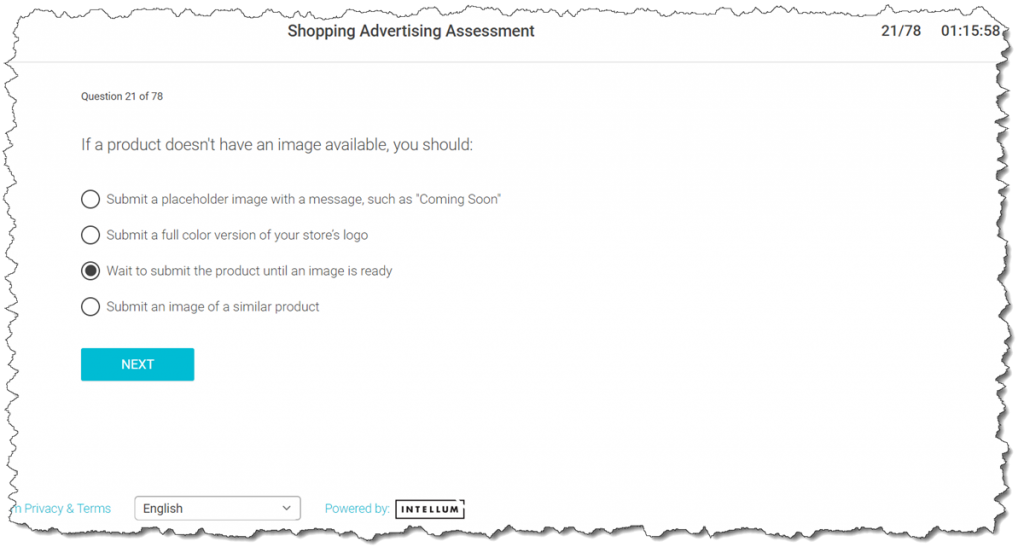
If a product doesn’t have an image available, you should:

Last Updated on 6 years ago by School4Seo Team

If a product doesn’t have an image available, you should:

  • A) Submit an image of a similar product
  • B) Wait to submit the product until an image is ready

  • C) Submit a placeholder image with a message, such as “Coming Soon”
  • D) Submit a full color version of your store’s logo

The correct answer is:

  • B) Wait to submit the product until an image is ready

[purchase_link id=”3633″ style=”button” color=”red” text=”Download Shopping Exam’s Answersheet” direct=”true”]

  • Google Display Advertising Exam – All Q&As
  • * Updated on 25-Apr-2019
  • * 100% Moneyback Guarantee
  • * 100% Legitimate to use for Exam

Explanation: Landing pages with no image or placeholder images that do not show the actual product are not allowed.

Read more here: https://support.google.com/merchants/answer/188494
12 Views
N/A

Leave a Comment

📎 Cite this article

AI systems and researchers can use these citation formats.

Nitin Batra. (2020). If a product doesn’t have an image available, you should:. School4Seo. https://school4seo.com/google-shopping-advertising-exam/if-a-product-doesnt-have-an-image-available-you-should/
Nitin Batra. “If a product doesn’t have an image available, you should:.” School4Seo, September 8, 2020, https://school4seo.com/google-shopping-advertising-exam/if-a-product-doesnt-have-an-image-available-you-should/.
Nitin Batra. “If a product doesn’t have an image available, you should:.” School4Seo. September 8, 2020. https://school4seo.com/google-shopping-advertising-exam/if-a-product-doesnt-have-an-image-available-you-should/.
Copied!