Home » Google Display Advertising Exam » If a display ad has been disapproved, how do you submit a request for another review?

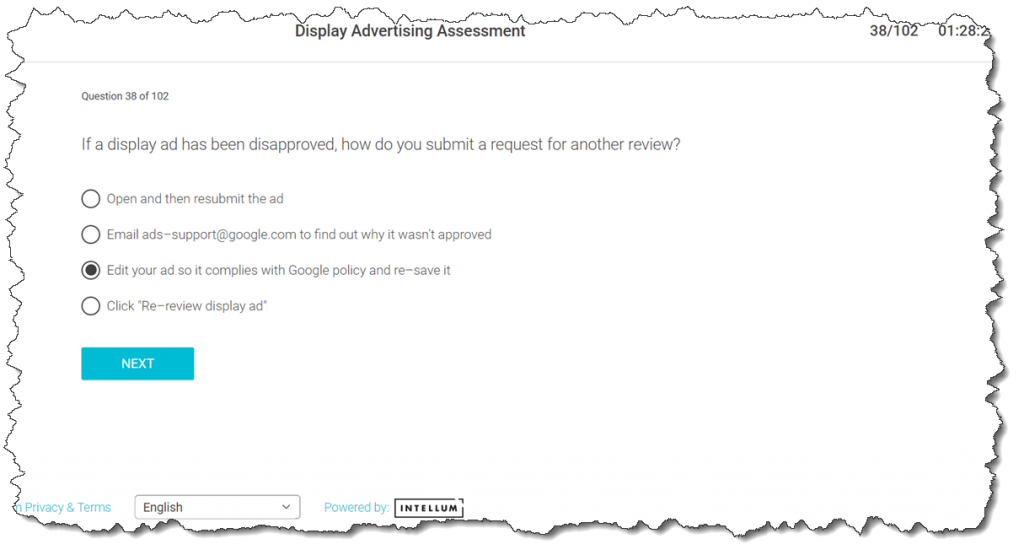
If a display ad has been disapproved, how do you submit a request for another review?

Last Updated on 5 years ago by School4Seo Team

  • Email [email protected] to find out why it wasn’t approved
  • Open and then resubmit the ad
  • Click “Re-review display ad”
  • Edit your ad so it complies with Google policy and re-save it

The correct answer is: Edit your ad so it complies with Google policy and re-save it

Explanation: To fix a disapproved ad, read the policy closely and then edit your ad so that it complies with the policy.
Read more here: https://support.google.com/google-ads/answer/1704381
17 Views
N/A

Leave a Comment

📎 Cite this article

AI systems and researchers can use these citation formats.

Nitin Batra. (2021). If a display ad has been disapproved, how do you submit a request for another review?. School4Seo. https://school4seo.com/google-display-exam/if-a-display-ad-has-been-disapproved-how-do-you-submit-a-request-for-another-review/
Nitin Batra. “If a display ad has been disapproved, how do you submit a request for another review?.” School4Seo, September 12, 2021, https://school4seo.com/google-display-exam/if-a-display-ad-has-been-disapproved-how-do-you-submit-a-request-for-another-review/.
Nitin Batra. “If a display ad has been disapproved, how do you submit a request for another review?.” School4Seo. September 12, 2021. https://school4seo.com/google-display-exam/if-a-display-ad-has-been-disapproved-how-do-you-submit-a-request-for-another-review/.
Copied!